4K Car Dash Cam Front and Rear for Car Night Vision DVR CCTV Monitor 128G
CardUSD $82.44
Condition : New
Free Shipping

Notify me when the price drops
We will email you if we find a lower price on this product!
Product Description
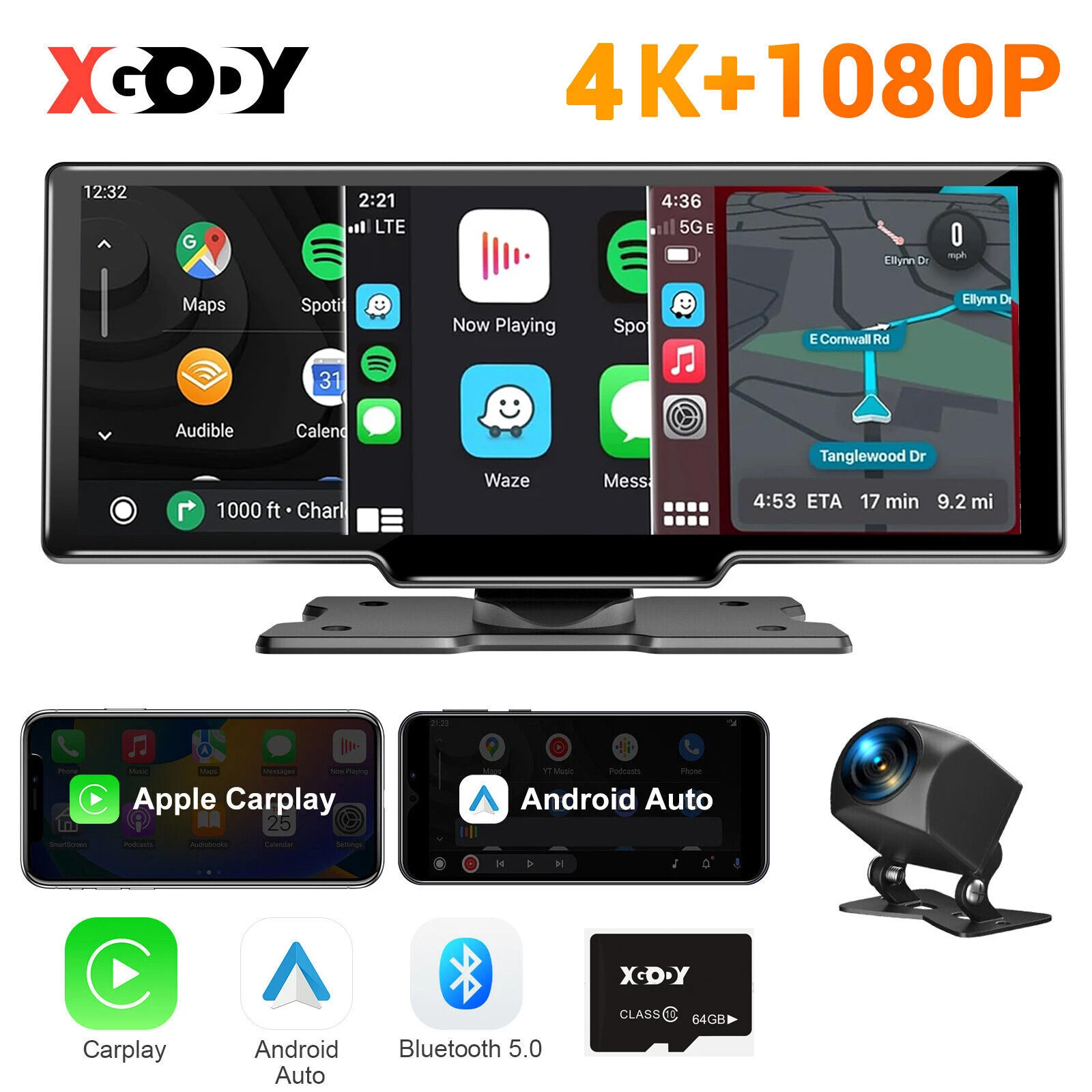
🔭 Ultra HD Dual Recording• Front True 4K UHD (3840×2160P) + Rear 1080P Full HD simultaneous recording
• Captures license plates & road signs with cinematic clarity 🎬 → 🚘
• Buck line connection enables continuous monitoring
• Auto-records collisions/vandalism even when parked 🔋 → 🌙🌞
• Real-time speed/coordinates mapping + travel history playback
• Dedicated player with trajectory analysis 📍 → 🗺️
• 3x faster than traditional 2.4GHz for instant video streaming
• Phone preview/download via app (iOS/Android) 📱⇄📹
• Wireless FM/Wired AUX dual-output modes
• Hi-Fi sound retention for calls/music 🎶→🔊
• Siri voice control + Android Auto compatibility
• Hands-free calls/messages/navigation 🗣️→📍
• Standalone mode: Full-time dual-cam recording
• Connected mode: CarPlay/Android Auto smart features 📹⇄📱
• 8+ language support (English/Chinese/Japanese etc.)
• 128GB max storage support 💾→🌍
(All specs verified per product datasheet. eBay compliant)
⚙️ Technical Highlights✅ Dual Projection:CarPlay (iPhone) / Android Auto
✅ HDR Optimization:Auto-brightness streaming mirror
✅ Multi-Card Support:32G/64G/128G TF cards
🚗 Perfect For:
• Night drivers 🌙
• Long-distance travelers 🛣️
• Urban commuters 🏙️
Supports Two Screen Projection Modes:
For Iphone: Carplay
For Android Phone:Android Auto
Language Support:
English, Chinese, Korean, Japanese, Polish, French, German, Russian,(Can be added)
Memory Card Support: 32G/64G/128G
Due to the fact that DVR is a 4K high-definition recording high-speed storage, please make sure to use high-quality U3 grade C10 high-speed brand memory cards. Some ordinary and inexpensive memory cards may not function properly.
About Formatting The Memory Card:
When installing a memory card for the first time, be sure to format the memory card on the DVR. After formatting, the DVR can correctly match the memory card.
Formatting Steps: After installing the memory card, please enter the DVR menu, find the format option, and click to format the memory card(Important: Formatting the memory card on the computer is an incorrect operation. Please be sure to format the memory card on the DVR's menu option.)
About The Connection Of Carplay And Android Auto:(1) If it is an Apple phone, the DVR needs to choose the Carplay connection method as the connection method, and the Carplay software installed on the Apple phone can directly connect to the DVR through the Carplay function;(2) If it is an Android system phone, the DVR needs to select Android Auto as the connection method, and then use the Android Auto software downloaded from the Google App Market on the phone to connect to the DVR.
About WIFI Connection:
Before connecting to the DVR on the phone, it is necessary to install the WIFI connection app "Viidure" in advance.You can search for "Viidure" installation in the Apple App Store or Google App Market.
Steps:
(1) In standby mode, enter the DVR menu and enter the WIFl setting menu;
(2)In the wifi menu of the DVR, check to obtain the wifi SSID name and password;
(3)Open the "Viidure" APP on your phone, enter the configuration mode, turn on the wifi function of the phone, follow the prompts to find the SSID wifi signal of the DVR and enter the password to connect;
(4)After successful configuration, you can connect and operate the DVR through the "Viidure" APP.
About The Reversing Assist Function:
If the kit you ordered includes a rearview camera and you need to implement the reversing assist function, you need to connect the red signal wire of the rearview camera to the car's reversing light (the light will come on when reversing). If you don't need the reverse assist function, just disconnect the red signal wire and leave it unconnected.
About 24-Hour Parking Monitoring:
If you need the 24 hour parking monitoring function, you can order the corresponding Buck Line accessories to replace the car charger.Through Buck Line, the DVR power can be obtained directly from the car battery or car ACC, so that the DVR can maintain normal recording work even when the car is turned off.(Since different car models have different battery interfaces or ACC interfaces, it is not recommended to install it by yourself. It is recommended to find a professional to install the Buck Line.)
Fast Replies
We respond to all messages within 24 hours (Mon-Fri). If you don't hear from us, please message again - we'll prioritize your request.Share Your Experience
Enjoyed our product? We'd truly appreciate your positive feedback to help our small business grow.Problem Solving
Before leaving negative feedback:
• Contact us first via eBay Messages
• Allow 1 business day for our solution
• We promise to make things right
Thank you for supporting our shop!
ShippingShipping Time:
✔ Processing: 1-3 business days (excluding weekends/holidays)
✔ Local Warehouse (US/UK/AU/EU): 1-5 business days
✔ China Warehouse: 6-10 business days
Tracking & Support:
• Tracking number provided after shipment
• Contact us for any delays – we’ll help!
Thank you for your patience! 🚚
ReturnsEligibility:✔ Defective Items: Notify us within 15 days of delivery for free replacement/refund
✔ Change of Mind: 30-day returns (item must be unused, in original packaging)
Process:
Contact us via eBay Messages for return authorization
Ship item back (buyer pays return shipping*)
Refund processed within 3 business days after receipt
We appreciate your trust and promise hassle-free solutions!
Copyright © 2022 Tongtool
10.26" 4K Car DVR Wireless Carplay Portable Android Auto Stereo IPS Touch Screen
By Unbranded

$79.99





 .
.
